The following features should be available to you after following this config:
- Upon answering calls, Callswitch can automatically bring up candidate/ contact record in Bullhorn of the person calling if they are in the database.
- Bullhorn candidate/ contact numbers are now accessible via CallSwitch One app by searching names.
- One click call is enabled via the Google Chrome Extension.
To enable the integration please complete the following steps:
- Install CallSwitch One browser extension: https://chromewebstore.google.com/detail/callswitch-one-click-to-d/jbkedfooemeccbfebnjlcmkdhondnmjm…
- Open CallSwitch desktop app.
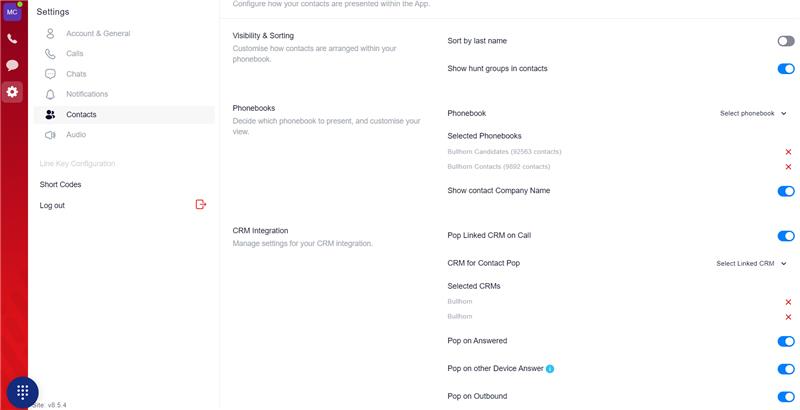
- Navigate to: Settings Cog > Contacts > CRM Integration.
- Apply the settings in the "Settings screenshot".
- Do a full sign out and sign back in to confirm the changes have applied.
Settings screenshot:
Was this article helpful?
That’s Great!
Thank you for your feedback
Sorry! We couldn't be helpful
Thank you for your feedback
Feedback sent
We appreciate your effort and will try to fix the article